Free Noise Reduction Plugins for Voice: What Each One Really Costs
Published October 13, 2026There are four genuinely free noise reduction plugins worth installing for voice, and the right one depends less on quality than on which app has to load it. The RNNoise plugin is open source and built for live speech. Bertom Denoiser Classic is pay-what-you-want, which includes $0, and runs with zero latency. TL NoiseReducer is freeware with a standalone app as well as the plugin. ReaFIR, from Cockos's free ReaPlugs pack, is the old Windows-only workhorse. One plugin that keeps turning up in "free" lists, tape.it's Denoiser, isn't free at all.
The trap nobody mentions is format. OBS only loads VST 2.x plugins. Audacity 4 loads VST3 and doesn't load VST2. So a plugin that's perfect for your podcast editor can be invisible to your streaming app. Below is every option with its receipt (price, formats, systems, live or offline), checked against each developer's own download page on October 9–10, 2026.
The short list: formats, systems, live or offline
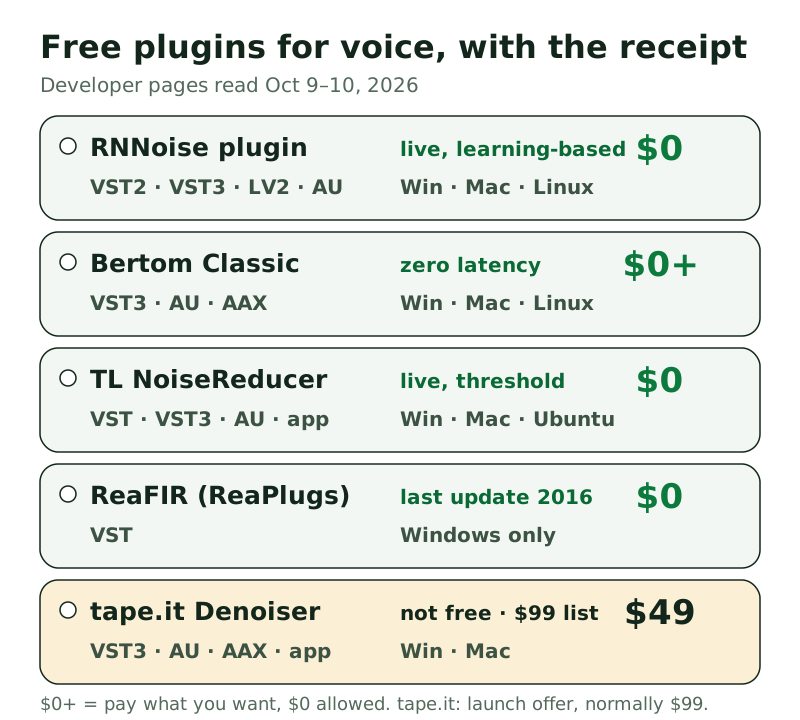
RNNoise plugin (noise-suppression-for-voice). $0, GPL-licensed, by GitHub user werman. It comes in VST2, VST3, LV2, LADSPA, AU and AUv3 for Windows, macOS and Linux. It's learning-based and built for real-time speech, with a voice-activity threshold you can tune. It needs 48 kHz audio. The last stable release is v1.10 (May 2024), and a v1.21 pre-release came out in May 2026. This is the only one on the list that loads in both OBS and Audacity 4, because it ships both VST2 and VST3.
Bertom Denoiser Classic. Pay what you want, "including for free", in Bertom Audio's words. It's VST3 and AAX on Windows 7+, VST3, AU and AAX on macOS 10.13+ (Apple silicon included), and VST3 on Linux, at version 3.0.11. Bertom describes it as zero-latency with low CPU use and no FFT, so it avoids the swirly artefacts spectral tools can leave, and says it's made for "music, post-production and live use". There's no VST2 build, so it won't load in OBS. A paid Denoiser Pro exists, but Bertom's US page didn't render a price for us, so we're not quoting one.
TL NoiseReducer. Freeware from ToneLib, in 64-bit VST, VST3, AU and standalone, for 64-bit Windows (Vista through 11), macOS 10.13+ and Ubuntu 18+. It has two units: a Noise Reducer with an automatic mode that boils everything down to one threshold slider, and EasyGate. ToneLib built EasyGate from a guitar noise-gate pedal and says it responds "primarily to the guitar's frequencies", so for voice, lean on the Noise Reducer unit. The standalone app is handy if you don't own a host at all.
ReaFIR (in ReaPlugs). Cockos gives away a pack of REAPER's own effects as ReaPlugs. ReaFIR is an FFT-based processor with a Subtract mode that learns a noise profile and removes it, which is the classic way to clean a steady hiss. The catch is age. The download page lists Windows versions up to Windows 7 and a last release, v2.36, dated January 2016, in VST format only. OBS's own guide lists ReaPlugs among the plugins it was tested with, so it's still a reasonable pick for OBS on Windows. Don't expect updates.
Not free: tape.it Denoiser. It shows up in free roundups, but its page lists a one-time price of $49 as a launch offer, normally $99, for VST3, AU and AAX plus a standalone app on Windows and macOS. A free online trial exists. It's a good tool. It's just not a free one.
How plugin denoisers differ: spectral, learning-based, gate-style
Knowing the family tells you how a plugin will fail, which is more useful than any star rating.
Profile (spectral) subtraction. You play the plugin a few seconds of room noise on its own, and it subtracts that fingerprint from everything. ReaFIR's Subtract mode and Audacity's built-in Noise Reduction work this way. It's excellent on steady hiss and hum. On changing noise it struggles, and pushed too far it leaves a watery, "underwater" texture.
Learning-based. A trained model decides what's speech and what isn't, frame by frame. The RNNoise plugin is the free example. It copes with noise that changes, like traffic, keyboards and fans spinning up, and needs no noise sample. Its blind spot is anything speech-shaped. Background voices and a TV sail through, because the model was trained to keep speech.
Gate and expander style. These turn the level down when it falls below a threshold, so they act in the gaps rather than under your words. TL's EasyGate is the clearest example, and its Noise Reducer unit works with a threshold too. They're light on CPU and transparent while you talk. The trade-off is that whatever noise sits under your voice stays.
Bertom's Classic sits between families. Its developer only says it uses no FFT and has zero latency. Treat it as a smooth, low-artefact option and judge it by ear.
Using a plugin in OBS, Audacity, Reaper and DaVinci Resolve
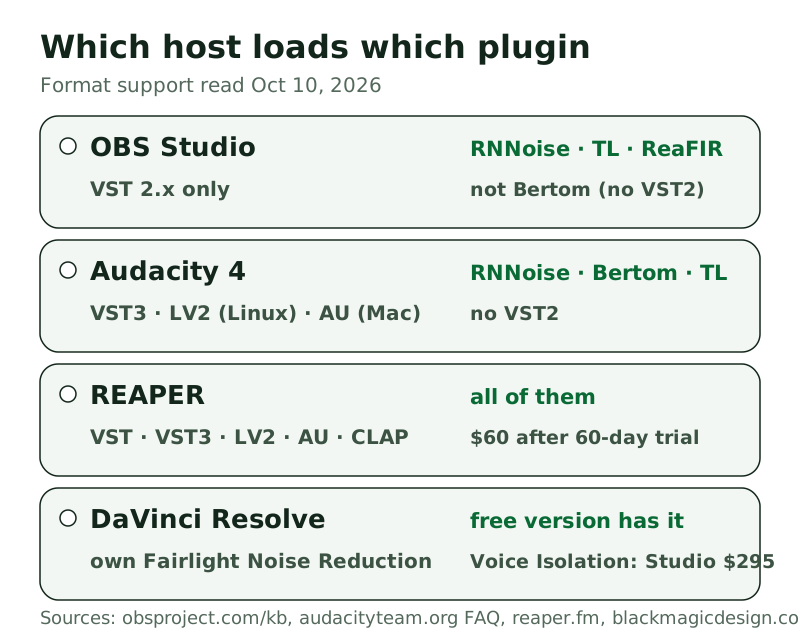
OBS Studio. Add a VST 2.x Plug-in filter to your mic source and choose the plugin from its list. OBS's knowledge base says VST3 isn't supported, and it looks only in the standard VST folders: on Windows that includes C:\Program Files\VSTPlugins and the Steinberg folders, and on macOS /Library/Audio/Plug-Ins/VST. Before installing anything, remember OBS already has free RNNoise built into its Noise Suppression filter. Our OBS noise suppression page covers that route. The plugin only adds the voice-threshold controls.
Audacity 4. Audacity's FAQ says version 4 supports VST3 and Nyquist plugins on every platform, LV2 on Linux and Audio Units on macOS. Put the VST3 file in your system's VST3 folder, restart, and it appears in the Effect menu. Before you do, try Audacity's own Noise Reduction effect under Effect, then Noise removal and repair. It's built in, free and well documented, and our Audacity guide walks through it.
REAPER. It loads VST, VST3, LV2, AU and CLAP, so every plugin on our list works there, and ReaFIR is built in. Just know REAPER itself isn't free. Cockos gives you 60 days of full evaluation, then asks $60 for the discounted personal licence (reaper.fm, read October 10, 2026).
DaVinci Resolve. The free version already includes a Fairlight Noise Reduction effect with De-Hiss, De-Rumble and combined presets that can learn from a noise selection. It also has Dialogue Leveler and De-Hummer. Voice Isolation, the AI one that grabs the headlines, is Studio-only, and Studio costs $295 one time (blackmagicdesign.com, read October 9, 2026). Try the free effects before adding third-party plugins to Resolve.
Where plugins beat online tools, and where they don't
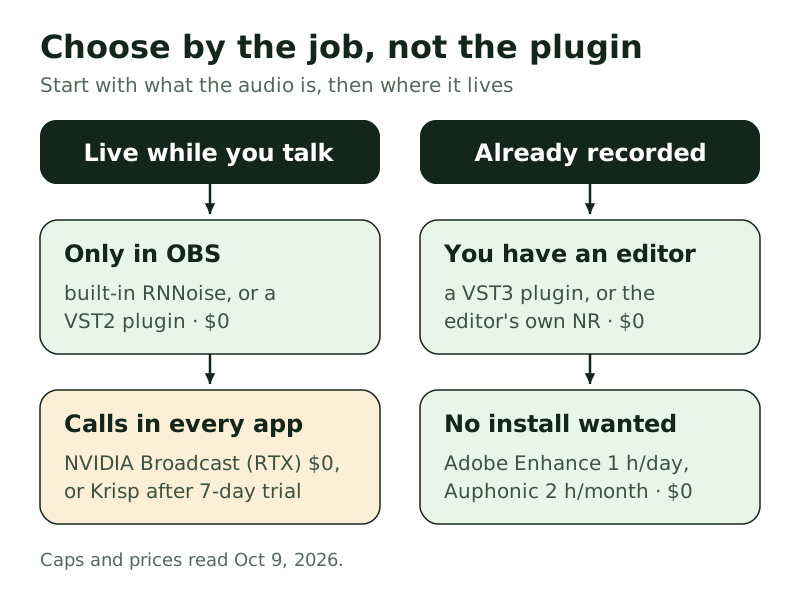
Plugins have three things going for them. They're free with no meter, so an eight-hour recording costs the same as an eight-second one. Your audio never leaves your machine. And the live-capable ones work while you speak, which no upload service can.
Online tools win on effort and on hard noise. Adobe Podcast's Enhance Speech gives you 1 free hour a day, with no single upload allowed past 30 minutes or 500 MB (read October 9, 2026), and Adobe says it removes both noise and echo. Our Adobe Podcast Enhance page covers it. Auphonic's free tier gives you 2 hours of processed audio a month, with no rollover, and handles levelling and loudness targets as well as noise. If you record one weekly show and hate fiddling with thresholds, an online tool may be the better $0.
Would rather not tune thresholds at all?
Auphonic's free tier processes 2 hours of audio a month, with levelling and noise reduction and nothing to install.
Try AuphonicGreen button = affiliate link, routed through our own redirect. Your price never changes; full disclosure in the footer.
Live calls are a different job. Plugins live inside one app. To clean your mic in Zoom, Teams or Discord too, you need a system-wide virtual microphone. On an RTX card under Windows, NVIDIA Broadcast does that free. Otherwise the paid route is Krisp: a week's trial without a card, after which each user pays $8 a month on yearly billing or $16 paying monthly (krisp.ai/pricing, October 9, 2026). Don't pay for it to clean recordings. That's what the plugins above are for.
The noise is on your calls, not your files
Krisp works in every app with a mic setting. Try it for seven days without a card; afterwards Core runs $8 a month when billed yearly.
Try Krisp free for 7 daysGreen button = affiliate link, routed through our own redirect. Your price never changes; full disclosure in the footer.
When a free plugin won't load or sounds wrong
It doesn't appear in the list. Nine times out of ten it's the format. A VST3 file is invisible to OBS, and a VST2 file is invisible to Audacity 4. Next, check the folder: OBS only scans the standard VST paths in its knowledge base, unless you've set a VST_PATH variable on Linux, in which case it scans only that. Then check the architecture. TL NoiseReducer is 64-bit only, while ReaPlugs offers separate 32-bit and 64-bit downloads, so match your host.
It loads, then your voice sounds robotic. With the RNNoise plugin, check the sample rate first, because its README says to use 48 kHz only. Otherwise you're probably running two denoisers at once, such as a plugin plus OBS's own Noise Suppression filter, or a plugin plus a headset's built-in processing. Keep one.
Word endings vanish. That's a threshold set too high. Lower the RNNoise plugin's VAD threshold (its README suggests 85–95% as a starting range) or raise its grace period. On TL's units, ease the threshold slider down.
It works in the editor but not live. Some plugins add latency or use more CPU than a live chain can spare. Bertom's Classic is zero-latency by design and the RNNoise plugin was built for real time. Profile-based tools like ReaFIR's Subtract mode need a clean noise sample, so they're happier on a file than on a mic whose room keeps changing.
Safe downloading: official sources only
Free audio plugins attract repackagers. Search for any of these names with "free download" and you'll see mirror sites, "full version" bundles and installers wrapped in adware. A plugin runs inside your audio app with its permissions, so a bad one can do a lot more than sound wrong. Our rules:
- Download only from the developer: github.com/werman for the RNNoise plugin, bertomaudio.com, tonelib.net and reaper.fm.
- If a "free" download needs an installer you didn't expect, a browser extension or a cracked licence, walk away. Every plugin on our list is a plain zip or installer from its maker.
- Paid plugins offered "free" on third-party sites are pirated copies. Bertom's own pay-what-you-want page already lets you pay $0 legally.
- Check the version against the developer's page. If a mirror offers a "v4" of something whose maker lists v3.0.11, someone has relabelled it.
Free noise reduction plugin questions
What is the best free noise reduction plugin for voice?
For live speech, the RNNoise plugin, because it's learning-based, open source and ships the VST2 that OBS needs. For editing recordings, Bertom Denoiser Classic (pay what you want, from $0) is the smoothest to try. Both run on Windows, macOS and Linux.
Is there a free noise reduction VST for OBS?
Yes, but it must be VST 2.x, the only plugin format OBS loads. The RNNoise plugin, TL NoiseReducer and ReaFIR (Windows only) qualify. Bertom's Classic is VST3, AU and AAX only, so it won't show up in OBS.
Which free noise reduction plugin works with DaVinci Resolve?
Start with Resolve's own free Fairlight Noise Reduction effect, which can learn a noise profile. Voice Isolation needs Resolve Studio at $295. Check Resolve's plugin support for your version before relying on a third-party plugin there.
Does Audacity need a noise reduction plugin?
No. Audacity ships its own Noise Reduction effect. Add a plugin only if you want live-style processing or a different sound. Audacity 4 loads VST3, not VST2.
Are free noise reduction plugins safe?
The ones on this list are, when downloaded from the developer's own page. The risk comes from mirror sites and "full version" bundles, which can carry adware or worse. If the source isn't the maker, don't install it.
Every price, format, system requirement and version on this page was read on github.com, bertomaudio.com, tonelib.net, tape.it, reaper.fm, obsproject.com, audacityteam.org, blackmagicdesign.com, podcast.adobe.com and auphonic.com on October 9–10, 2026, and Krisp's price on krisp.ai/pricing on October 9, 2026. Spot something stale? Tell us at crew@freehush.com.
Try Krisp free for 7 days — then decide
No card needed for the trial. When the week ends it simply stops unless you choose a plan; Core is $8 a month billed annually.
Try Krisp free for 7 daysGreen button = affiliate link, routed through our own redirect. Your price never changes; full disclosure in the footer.