RNNoise Explained: The Free Noise Suppressor Already in Your Apps
Published October 13, 2026RNNoise is a free, open-source noise suppressor for voice, and there's a good chance it's already on your computer. If you use OBS Studio, it's the default engine inside the Noise Suppression filter. If you're on Linux, it's in the noise reduction effect of EasyEffects. If you want it anywhere else, a free plugin wraps it for Windows, macOS and Linux. It costs nothing, it runs on an ordinary CPU, and nobody asks you for an account.
What it can't do is tell your voice from someone else's. RNNoise keeps anything that sounds like speech, so it clears fans, hum and keyboard noise between words and leaves the housemate on the phone exactly where they were. This guide covers what it is, every free way to get it, how to install the plugin without a wrong turn, and when it's time to pay for something stronger. Facts were read from Xiph's project pages, the plugin's GitHub repository and OBS's release notes on October 9–10, 2026.
What RNNoise is, in one paragraph
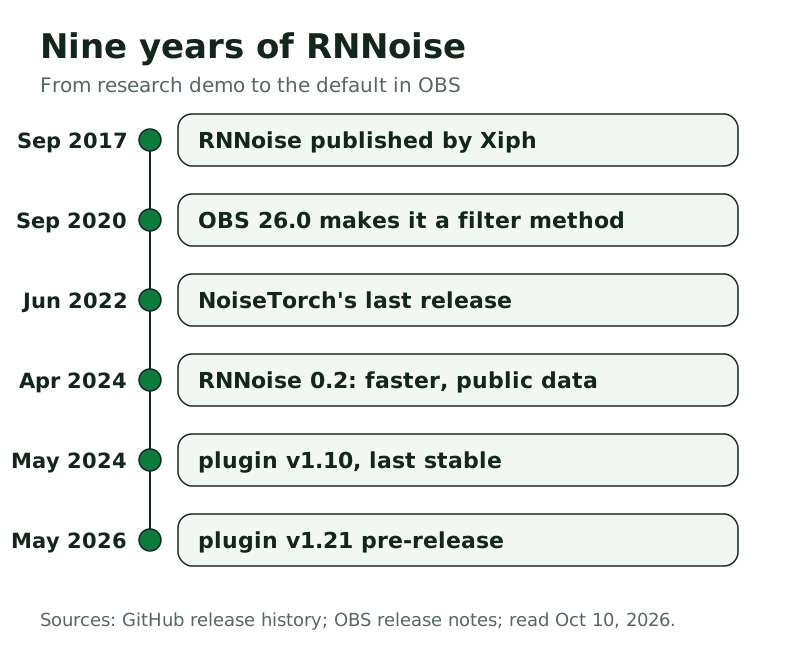
RNNoise is a noise-suppression library written by Jean-Marc Valin and published by Xiph.Org, the foundation behind Opus and Ogg, in September 2017. It's a hybrid: classic signal processing does most of the work, and a small recurrent neural network makes the one decision that matters, how much of each frequency band to keep. The audio is split into 22 bands spaced the way the ear hears pitch, the network reads them every frame and hands back 22 gains, and those gains turn noisy bands down while letting speech through. Valin wrote that it looks only 10 ms ahead, because it was built for live calls rather than offline cleanup, and that the original model fit in 85 kB. The code is BSD-licensed, which is why so many free apps can ship it.
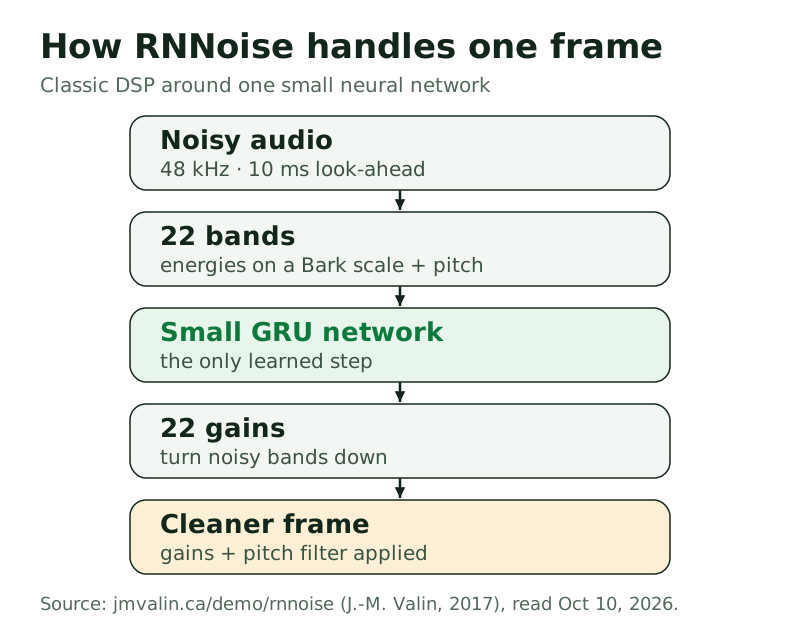
Two consequences follow, and they explain almost every RNNoise review you'll read. Because it adjusts whole bands instead of single frequencies, it avoids the warbly "musical noise" that older suppressors leave behind. And because it was trained to keep speech, anything speech-like gets kept too. The current release is RNNoise 0.2, published in April 2024, which added SSE4.1 and AVX2 speed-ups and retrained the bundled models using only public datasets.
Where you already have it: OBS and the other apps that ship it
You rarely install RNNoise on its own. The library on GitHub (xiph/rnnoise) is for developers, and its demo program only reads raw 16-bit PCM at 48 kHz, not WAV files. Ordinary people get it through an app that wraps it. Here's the shelf, with each one's status as of October 2026.
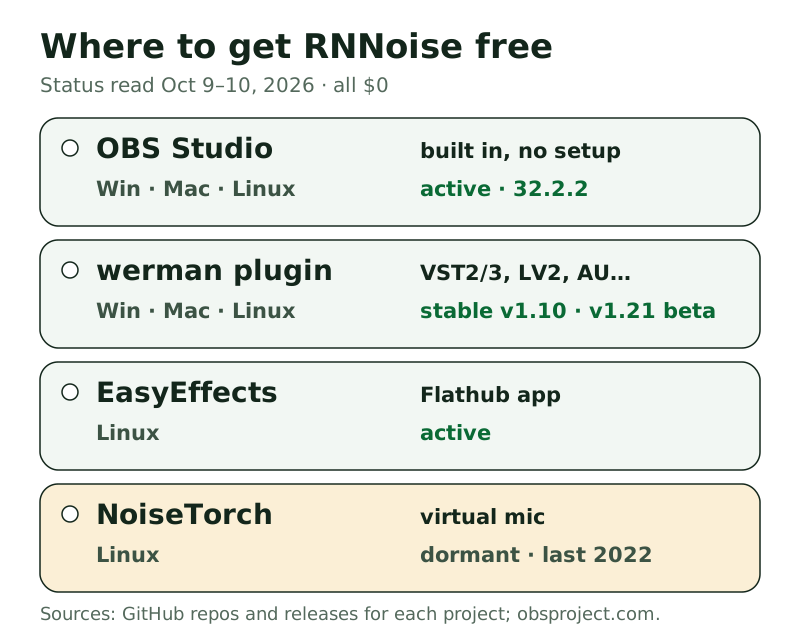
- OBS Studio. RNNoise became a method in OBS's Noise Suppression filter in version 26.0, released in September 2020, and it's the filter's default method today. It runs on Windows, macOS and Linux with nothing extra to install. There are no settings to adjust. Our OBS noise suppression guide covers the filter and where it belongs in the chain.
- The noise-suppression-for-voice plugin. A GPL-licensed plugin by GitHub user werman, built on RNNoise. It comes in VST2, VST3, LV2, LADSPA, AU and AUv3, with downloads for Windows, macOS and Linux. The last stable release is v1.10 (May 2024), and a v1.21 pre-release landed in May 2026. The repository is active. This is the "RNNoise VST" most people are searching for.
- EasyEffects (Linux). An audio-effects app for PipeWire, installed from Flathub. Its README credits RNNoise for the noise reduction effect, and a separate "deep noise remover" uses a different model, DeepFilterNet. The project was still updated in October 2026.
- NoiseTorch (Linux). A one-click virtual microphone for PulseAudio and PipeWire, also built on RNNoise. It isn't archived, but it hasn't had a release since June 2022, and its README carries a notice about a past security incident. We'd pick EasyEffects or the plugin today.
FFmpeg users have a related filter, arnndn, which its documentation describes as reducing noise "using Recurrent Neural Networks". It always needs a trained model file that you supply, so it's a scripting tool rather than a mic fix.
Installing the RNNoise VST plugin step by step
The plugin is worth installing for two reasons. It brings RNNoise to apps that don't ship it, and it exposes controls OBS hides. Download it only from the project's GitHub releases page. Search "rnnoise vst download" and you'll find rehosted copies, and there's no reason to trust a stranger's build of something that sits on your microphone.
- Open github.com/werman/noise-suppression-for-voice, go to Releases and download the zip for your system: win, macos or linux. Choose v1.10 if you want the last stable build, or v1.21 if you're happy with a pre-release.
- Unzip it and copy the format your app uses into your plugin folder. OBS's VST filter only loads VST 2.x, so OBS users need the VST2 file. Audacity 4 loads VST3 (plus LV2 on Linux and AU on macOS), and it doesn't load VST2.
- Restart the host app so it rescans its plugins. In OBS, add a VST 2.x Plug-in filter to your mic and pick the RNNoise entry from its list.
- Check your sample rate. The plugin's README is blunt: use 48,000 Hz only. If your mic or project runs at 44.1 kHz, change it to 48 kHz first, or the plugin won't behave.
- Set the VAD Threshold, the voice-probability cut-off below which the plugin goes silent. The README suggests 85–95% for most cases. Then raise VAD Grace Period if word endings get clipped.
On Windows, the README also describes a system-wide route through Equalizer APO, a separate free audio tool, so every app hears the cleaned mic. On Linux, it gives a PipeWire filter-chain config that creates a new "Noise Canceling source" you can select as your input. Both work, but both are an evening of setup rather than two clicks. If that sounds like a chore, EasyEffects gives Linux users the same engine through a normal window.
What it removes well, and what it can't
RNNoise is good at the problems most home setups actually have, and it's honest about the rest. Here's the split, from its design and the plugin author's own notes.
Handles well: steady noise such as computer fans, air conditioning, fridge hum and road rumble. The plugin's README, citing the original paper, lists fans, office, crowd, airplane, car, train and construction among the noise types it was trained on. Between sentences, it also cleans up keyboard and mouse clatter nicely.
Partly: sharp noise while you're talking. The plugin's README says loud sounds like a mechanical keyboard are suppressed when there's no voice, but "only reduced in volume when voice is present". So a key click mid-sentence gets quieter, not gone.
Can't: other voices, a TV with dialogue, or music with vocals. That's speech, and keeping speech is the whole job. It also doesn't remove echo or room reverb. That's a different problem, and RNNoise doesn't attempt it.
Can make worse: a poor microphone. The README warns that on a bad mic the model can mistake your voice for noise and thin it out. If you sound underwater with RNNoise on, move the mic closer before blaming the filter.
RNNoise vs Krisp vs NVIDIA: when the free engine is enough
Three engines turn up in every "best noise suppression" thread, and they aren't competing for the same buyer.
RNNoise is free, open source and light enough to run on any CPU. On its own it's unbeatable value for steady noise. Its limits are background voices and, outside OBS, the setup effort.
NVIDIA Broadcast is also free, but only on a GeForce RTX 2060 or better under Windows 10 64-bit, per NVIDIA's requirements page (read October 9, 2026). It runs on the graphics card and adds room echo removal. If you own the card, it's the stronger free option. If you don't, it isn't an option at all. Our NVIDIA Broadcast page has the details.
Krisp is a paid desktop app for Windows and macOS. It adds voice isolation for background voices and cleans incoming audio from other people's rooms too. Its trial lasts seven days and asks for no card; after that, Core costs $8 a user each month on a yearly bill, or $16 if you pay monthly (krisp.ai/pricing, October 9, 2026). After the trial, it stops unless you pay. The only $0 way to use Krisp's engine is the noise suppression option inside Discord.
So the decision is short. If your noise is a fan, a hum or traffic, RNNoise is enough and you should spend nothing. If it's people talking near you on calls, no free engine on this list will fix it, and that's the moment a Krisp trial is worth running.
The noise is voices? That's past what RNNoise can do
Seven days on trial, no card asked, voice isolation included. Once the week is up, Core is $8 a month on yearly billing.
Try Krisp free for 7 daysGreen button = affiliate link, routed through our own redirect. Your price never changes; full disclosure in the footer.
For recordings rather than live audio, you don't need a real-time engine at all. Audacity's noise reduction works on the file after the fact and is just as free. Our desktop roundup sorts the live options by what they need from your machine.
RNNoise questions
What is RNNoise?
It's a free, open-source noise-suppression library for speech, released by Xiph.Org in 2017. It mixes traditional signal processing with a small recurrent neural network, runs in real time on a normal CPU, and ships inside apps like OBS Studio and EasyEffects.
Is RNNoise free to use?
Yes. The library is BSD-licensed, the werman plugin is GPL-3.0, and OBS and EasyEffects are free, open-source apps. There's no paid tier, no account and no usage cap anywhere in the chain.
Is there an RNNoise VST?
Yes. The noise-suppression-for-voice plugin on GitHub comes in VST2, VST3, LV2, LADSPA, AU and AUv3 for Windows, macOS and Linux. Use VST2 in OBS and VST3 in Audacity 4, and download it only from the project's own releases page.
How do I use RNNoise in OBS?
You already have it. Open your mic's Filters, add Noise Suppression and pick RNNoise as the method. Install the plugin only if you want its voice-threshold controls, and then add it through OBS's VST 2.x filter.
Does RNNoise remove background voices?
No. It's trained to keep speech, so other people talking, a TV or lyrics stay in. For that you need voice isolation, which free RNNoise tools don't offer. A paid app like Krisp is built for it.
Every version, date and requirement on this page was read on GitHub (xiph/rnnoise, werman/noise-suppression-for-voice, wwmm/easyeffects, noisetorch/NoiseTorch, obsproject/obs-studio), jmvalin.ca, obsproject.com and audacityteam.org on October 9–10, 2026. Krisp's prices were read on krisp.ai/pricing on October 9, 2026. Spot something stale? Tell us at crew@freehush.com.
Try Krisp free for 7 days — then decide
No card needed for the trial. When the week ends it simply stops unless you choose a plan; Core is $8 a month billed annually.
Try Krisp free for 7 daysGreen button = affiliate link, routed through our own redirect. Your price never changes; full disclosure in the footer.