Adobe Podcast Alternatives: Which Free Cap Runs Out First
Published October 13, 2026The best free Adobe Podcast alternative depends on which of Adobe's limits you actually hit, and for most podcasters it isn't the one they expect. Adobe's free Enhance Speech gives you 1 hour a day, but caps each file at 30 minutes. A weekly 60-minute show fits inside the daily allowance with room to spare. It just has to go up in two halves. Each hosted alternative's free tier is smaller over a month: Auphonic gives 2 hours a month, Descript one hour a month, and Cleanvoice a one-time 30 minutes.
So switch for a reason, not for more free minutes. Auphonic if you want levelling and loudness done in the same pass. Descript if you edit by transcript anyway. Cleanvoice if filler words bother you more than hiss. And Audacity if you want no cap at all and don't mind doing it by hand. All caps on this page were read on each vendor's own pages on October 9, 2026. Prices for the paid tiers are left out where the vendor's page didn't show one to a US reader.
What Adobe's free tier actually allows (dated)
Adobe Podcast's features page lists the free Enhance Speech limits as 1 hour of enhanced speech per day, each file held to half an hour or 500 MB, audio only, one upload at a time, and no control over enhancement strength. Adobe describes the tool as removing "noise and echo" from voice recordings.
Premium raises that to 4 hours a day and files as long as 2 hours or as large as 1 GB. It adds video files, a strength slider and bulk upload, and comes with a 30-day free trial. Adobe's own pages disagree on how Premium is sold. The features page ties it to Adobe Express premium features, while the plans page now pairs it with an Adobe Firefly Pro plan. Adobe's pricing didn't render a Podcast Premium price for us, so check podcast.adobe.com before budgeting.
The limit people hit first is the 30-minute file cap, not the daily hour. The second is the missing strength control. On a noisy file, free Enhance can push a voice into the over-processed, slightly synthetic sound people call "robot voice", and the free tier gives you no way to dial it back. Our Adobe Podcast Enhance page has the full walkthrough.
Four alternatives and the cap each one hits
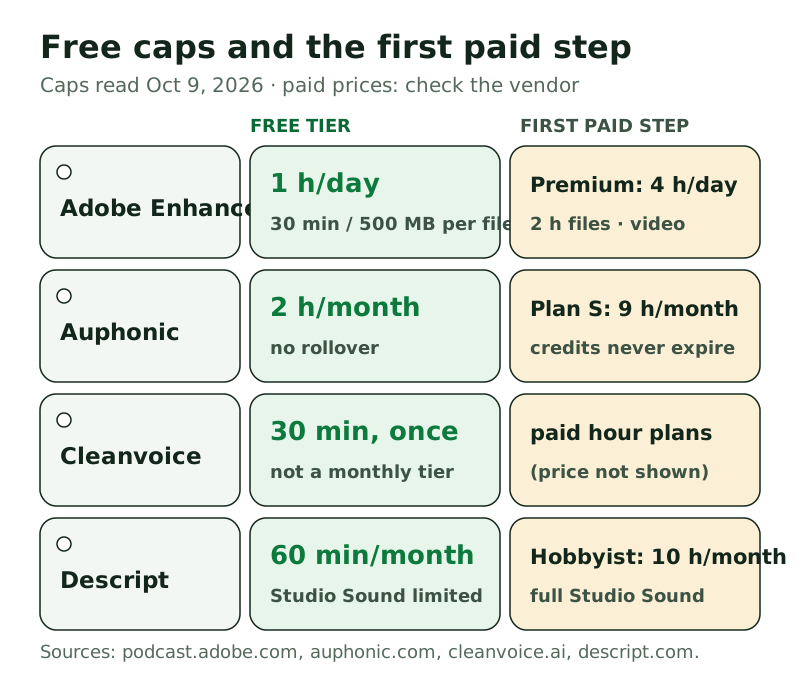
Auphonic: 2 hours a month, plus levelling. Auphonic's pricing FAQ invites everyone to use the free tier "for 2 hours per month", and unused free time doesn't roll over. It isn't a single button like Adobe's. It's a post-production chain: noise and reverb reduction (you choose whether to remove only static noise or fast-changing noise too), an Intelligent Leveler that balances speakers and music, and loudness targets you set. Paid recurring plans start at plan S with 9 hours a month, and one-time credit packs never expire, which suits shows that publish irregularly. Auphonic's prices didn't render for us, so we're not quoting one.
Cleanvoice: a 30-minute sample, then paid. You get 30 minutes of free credits when you sign up, no card needed, and that's it. It's a one-time credit, not a monthly tier. Cleanvoice's pitch is different from Adobe's. It lists a Filler Words Remover alongside noise removal, and its FAQ says it handles background noise, wind, echo and reverb. Paid plans are sold in hours. Use the free 30 minutes to see whether its filler-word removal is worth paying for on your voice.
Descript: one hour a month, inside an editor. Descript's free tier gives each editor 60 media minutes (1 hour) a month, plus 100 AI credits granted once. Its noise tool, Studio Sound, is marked "Limited" on the free tier and full from Hobbyist up. Hobbyist includes 10 hours a month. Exports on free are capped at 720p and aren't watermark-free. Descript makes sense if you already edit by transcript. As a straight Enhance replacement, its free allowance is among the smallest here.
Audacity: no cap, no cloud, more work. Audacity is free and open source on Windows, macOS and Linux, currently at version 4.0.1. Its Noise Reduction effect (Effect, then Noise removal and repair) learns a profile from a few seconds of room noise and removes it. There's no meter, and the file never leaves your computer. It doesn't target echo the way Enhance does. On steady hiss and hum, though, it does the job well, and our Audacity guide walks through it.
Worksheet: one 60-minute episode a week
Here's the test no vendor publishes: one 60-minute episode recorded every week, so about 4 hours of audio a month (5 in a five-week month). Run it through each free tier and see when it runs dry.
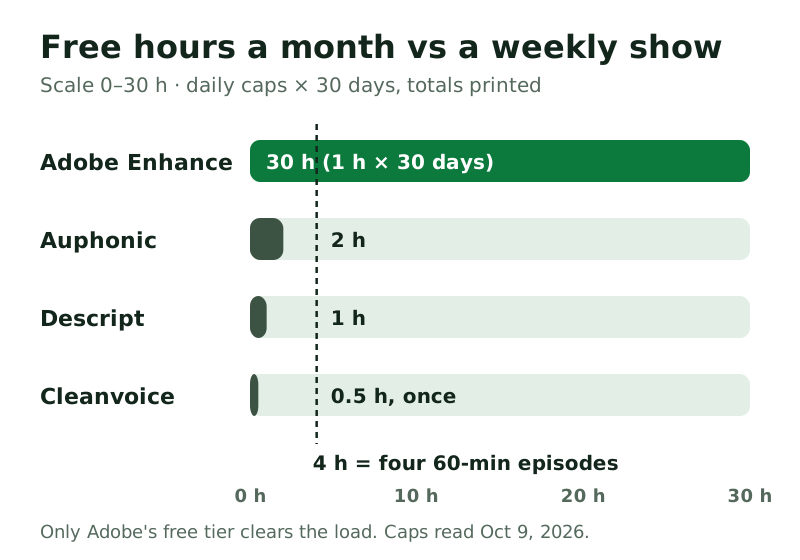
- Adobe Enhance, free. Each episode goes up as two 30-minute files. One episode uses one day's hour. Over a month the daily cap works out to about 30 hours, far above the 4 you need. It never runs out for this show. The costs are the splitting and the lack of a strength slider.
- Auphonic, free. 2 hours a month covers episodes 1 and 2. It runs out after week 2. Episodes 3 and 4 need a paid plan, a credit pack or another tool.
- Descript, free. One hour a month covers episode 1, with Studio Sound in its limited form. It runs out after week 1.
- Cleanvoice, free. 30 minutes, once. It covers half of episode 1 and never refills.
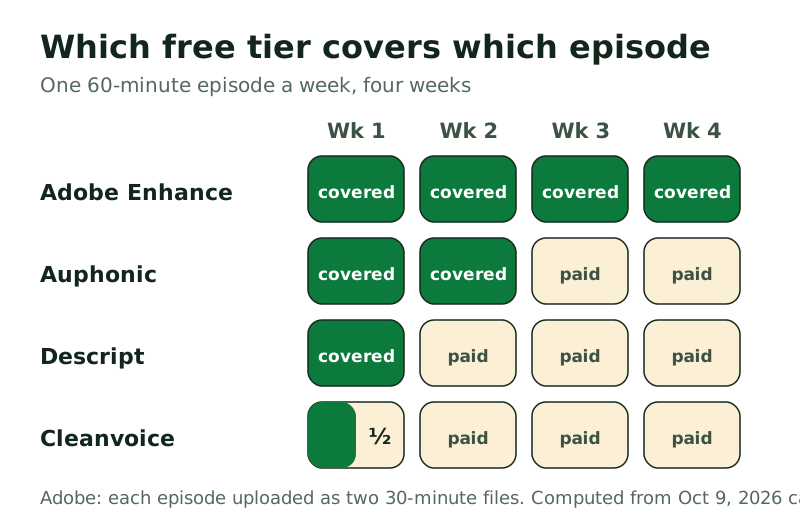
The arithmetic changes with your format. A 25-minute show fits Adobe's per-file cap without splitting, and Auphonic's 2 hours would cover four episodes and most of a fifth. A 90-minute interview show uses Adobe's hour a day across two days per episode, still for $0. If your show runs long or publishes more than weekly, Auphonic's one-time credits are the simplest way to cover the overflow, because they never expire.
Want levelling and loudness in the same pass?
Auphonic's free tier processes 2 hours a month. Try it on one episode before you decide.
Try AuphonicGreen button = affiliate link, routed through our own redirect. Your price never changes; full disclosure in the footer.
Quality trade-offs: over-processing and "robot voice"
Free caps decide whether a tool is usable. Over-processing decides whether you'll want to use it.
Adobe Enhance runs at one fixed strength on the free tier. The most common complaint about it is over-processing: on a very noisy file, voices can come out smooth and slightly artificial, and there's no slider to dial it back. Premium adds one. A common workaround is to mix a little of the original back in your editor, which is free.
Auphonic gives you more say. You choose the noise and reverb reduction and whether to tackle fast-changing noise as well as static noise, which makes it easier to keep a natural sound. The trade-off is effort: more settings to learn before the first good result.
Cleanvoice spends its effort on edits as much as on noise. Filler-word removal can make speech feel clipped if it's applied everywhere, so check its output on a full episode before trusting it.
Audacity fails differently. Push the noise reduction too far and you get a watery, "underwater" texture rather than robot voice. Use the lightest setting that does the job.
The cheapest fix sits upstream of all four: record cleaner. A close mic, a soft room and one person per mic beat any of these tools. If you record remote interviews over a call app, a live noise canceller on each guest's mic prevents the noise from being recorded in the first place.
Edge cases that change the answer
Your file is over 500 MB. Adobe's free tier caps files at 500 MB as well as 30 minutes. An uncompressed stereo WAV at 48 kHz and 24-bit runs to roughly 1 GB an hour (48,000 samples × 3 bytes × 2 channels × 3,600 seconds), so a 30-minute half comes to about 520 MB, close enough to the cap that the upload may be refused. Export the halves as mono, or as a compressed format, before uploading.
It's a five-week month. The load rises to 5 hours. Adobe's free tier still covers it. Auphonic's 2 hours still covers two episodes, so the gap grows to three.
You publish twice a week. That's about 8 hours a month. Only Adobe's free tier, or Audacity on your own machine, keeps up for $0.
The recording can't leave your computer. Every alternative here except Audacity is an upload service. For client calls or anything under an agreement, process locally.
Which to pick by job
- A weekly show, zero budget: stay on Adobe Enhance free and upload in 30-minute halves. Nothing else free covers a month.
- You also want consistent loudness: Auphonic free for two episodes a month, and one-time credits for the rest.
- Filler words are your real problem: test Cleanvoice's 30 free minutes on your messiest episode.
- You edit by transcript already: Descript, accepting that its free Studio Sound is limited.
- The file is confidential, or very long: Audacity, locally, with no upload and no cap.
- You need video files cleaned: Adobe's free tier is audio only, so you need Premium (with its 30-day trial) or Descript.
Adobe Podcast alternative questions
Is there a free alternative to Adobe Podcast Enhance?
Yes, several. Auphonic gives 2 hours a month free, Descript one hour a month, Cleanvoice a one-time 30 minutes, and Audacity unlimited local processing. But for a weekly show, Adobe's own free tier (1 hour a day, 30-minute files) still allows the most free audio per month.
What is the free limit on Adobe Podcast Enhance?
As of October 9, 2026: 1 hour of enhanced speech per day, files no longer than 30 minutes or bigger than 500 MB, audio only, one upload at a time and no strength control. Premium raises that to 4 hours a day and 2-hour files.
Why does Adobe Podcast make my voice sound robotic?
Usually it's over-processing. The free tier runs at a fixed strength with no slider, and very noisy files suffer most. Record closer to the mic, mix some original audio back in, or try a tool with adjustable settings, like Auphonic.
Is Auphonic better than Adobe Podcast?
They do different jobs. Auphonic levels speakers, hits loudness targets you set and reduces noise and reverb in one chain, with settings you control. Adobe's free Enhance is one fixed process aimed at voice, noise and echo. Auphonic's free 2 hours a month covers about two hour-long episodes.
Can I use Adobe Podcast Enhance for video?
Not on the free tier, which is audio only. Premium adds MP4 and MOV support. Otherwise, extract the audio, enhance it, and put it back in your video editor.
Every cap on this page was read on podcast.adobe.com, auphonic.com, cleanvoice.ai, descript.com and audacityteam.org on October 9, 2026. Paid prices are left out where the vendor's page showed no amount to a US reader. Spot something stale? Tell us at crew@freehush.com.
Try Krisp free for 7 days — then decide
No card needed for the trial. When the week ends it simply stops unless you choose a plan; Core is $8 a month billed annually.
Try Krisp free for 7 daysGreen button = affiliate link, routed through our own redirect. Your price never changes; full disclosure in the footer.